Posts

Showing posts with the label web technologies

Setup your own localhost tunneling service for your Mozilla Web Things gateway

Image
Hey Guys, It has been a while writing  blogs, and I wanna give a fresh start again with some interesting open source tools, which can help you to access your IoT prototypes from anywhere securely using your very own custom domain name. This blog is inspired by Mozilla's IoT project which uses similar concept to securely access their Web Things gateways. Today I have come up with something interesting which you can try at your home to securely access your localhost servers through a custom domain name. Although you need to invest some pennies to buy your own domain name, most of the other stuffs are free to use in this project !! In this blog, what you will learn ? How to setup and run an EC2 server in AWS Installing NGINX and Pagekite in your EC2 server How to buy and manage your own custom domain name in Godaddy How to Create a wildcard DNS( to create multiple sub-domain ) Run a localhost client application in Raspberry pi( it can be any client device, i love ras...

An introduction to the Web of Things(WoT) using TP Link Smart bulb

Image
Connect your first ever TP link smart bulb to web and start developing Web of Things(WoT) !! Hi Guys, Today, let’s come out of LEDs, resistors, breadboards, connecting wires, blahbalahblah and just start playing with a real world smart thing….Wondered?? I have chosen an LB 100 Smart Bulb from TP link for our development today and it should work with most of the models of TP link smart bulbs. Let’s go and Connect our first ever TP link bulb to web and start developing Web of Things (WoT). In this blog, what you can learn ? What is Web of Things(WoT)? URL and WoT How Web protocols and HTTP methods works with this smart bulb A simple user interface to turn ON and OFF your light-bulb and control its brightness from Web URL Recommended Reading: It is recommended to read the led control using web technologies for deeper understanding of HTTP methods and other Web concepts https://avenkat-iot.blogspot.com/2018/06/led-control-using-web-technologieshtml.html Assump...

LED control using Web Technologies(HTML, Node.js, Express.js)

Image
Today Let's take the first step to rule the web world with things.... LED, the first thing ever in the world of IoT and controlling it is the "hello-world" in the world of electronics. .. In this blog, what you can learn ?  1.Connecting things(LED) to the web 2.Controlling things(LED) from the web 3.Use of Node js and Express js in ruling the web world. 4.Understanding some basic HTTP methods and how they can be used with things  Assumption Here I have assumed that you have installed node js,npm and express js and git in your raspberry pi. If you need more information on installation of node js and npm, pls follow this link  http://www.instructables.com/id/Install-Nodejs-and-Npm-on-Raspberry-Pi/ To install express just type npm install -g express to install express globally To install git type  sudo apt-get install git Requirements 1. An LED and 1K ohm resistor 2. Raspberry Pi 2,3 3.Bread board and Connecting wires Github Repo...

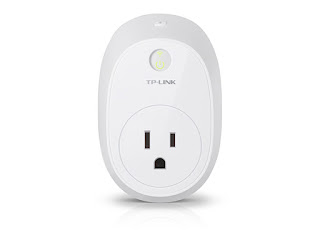
Using TP-LINK HS110 smart plug for a Simple Energy Monitoring System

Image
Hi Friends,                   I hope my previous blog for making a low cost open smart home using openhab for beginners would have helped you all to begin your first smart home project with minimum investments,pls check it here if you have missed it http://avenkat-iot.blogspot.com/2017/01/making-simple-open-smart-home-using.html Today, In this blog I am going to show you how to develop a Simple but effective energy monitoring system(EMS) using a TP-LINK HS110 smart plug because TP-LINK brand has provided open API for their developers.So lets start developing our simple EMS..........:)    This project can be implemented in both your windows PC and even your cool Raspberry Pi.Here I have developed this system from my window's PC and you can also implement the same system in your raspberry pi too. To begin this product, you need to buy a TP LINK HS110 smart plug which is available in the market at a price of  $60(SGD).P...